
You cannot withdraw from Khelv until a payout account is saved. Adding one takes a minute, but a single wrong digit can hold up your money, so it is worth doing carefully.
What You Need
- Bank account in your own name
- Account number
- IFSC code (on your passbook, cheque book or bank app)
- Registered mobile number
- Or a UPI ID linked to the same name
Steps to Add a Bank Account
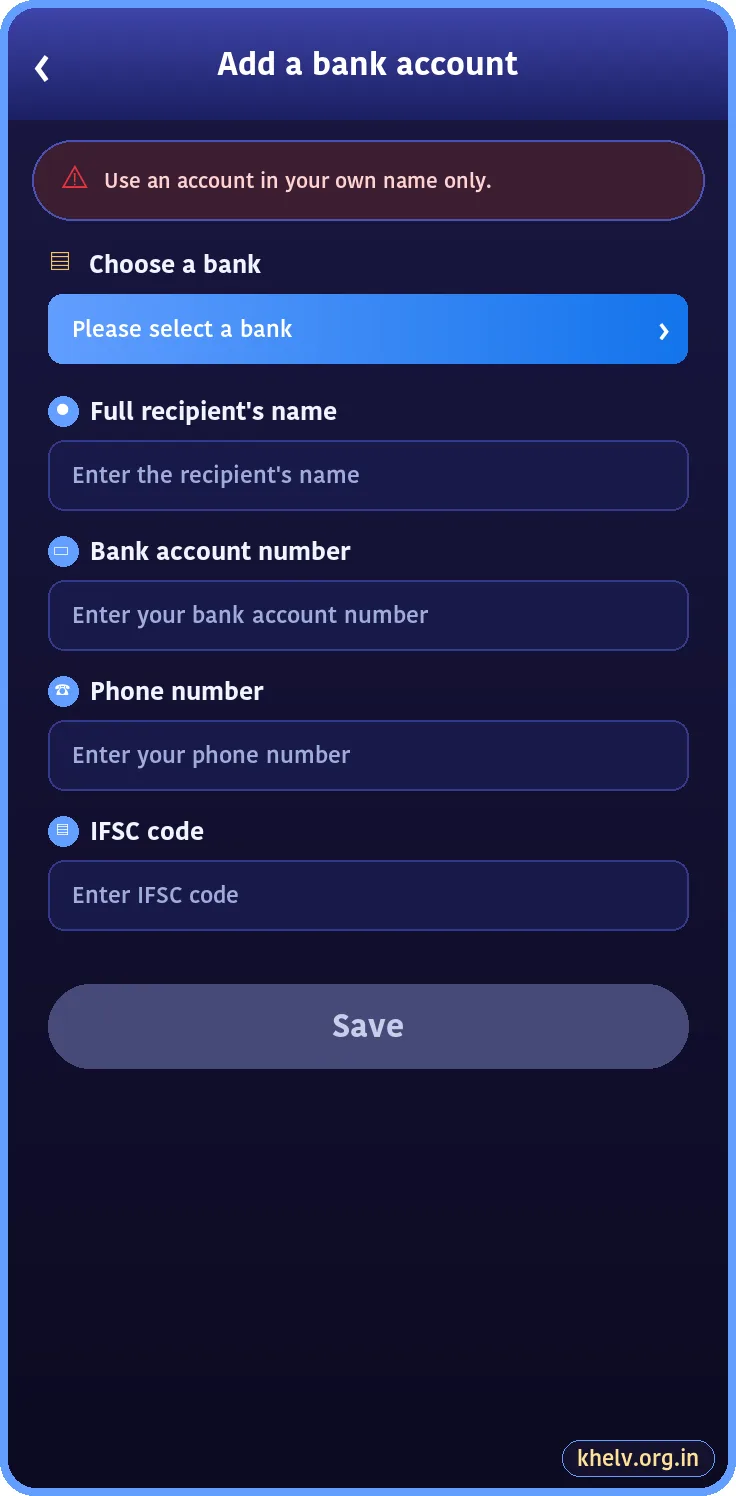
- Log in and open Wallet → Withdraw.
- Tap Add a bank account number.
- Choose your bank from the list.
- Enter the full name exactly as the bank shows it.
- Enter the account number and phone number.
- Enter the IFSC code.
- Tap Save.
Adding a UPI ID
On the Withdraw screen, choose UPI and enter your UPI ID (for example name@okbank). The name linked to the UPI ID should match your bank name.
Common Errors
| Error | Fix |
|---|---|
| Name mismatch | Use the exact name on the bank account |
| Invalid IFSC | Check for letter O vs number 0 |
| Account already bound | One bank account can be linked to one Khelv account only |
| Cannot edit | Ask customer care to change a saved account |
Safety Tips
- Never add someone else’s account.
- Never share your UPI PIN; withdrawals do not need it.
- Use a withdrawal password if the app offers one.
Once saved, follow the Khelv withdrawal steps to request a payout.
Related Khelv Guides
- Khelv Game – the complete Khelv guide home page
- Khelv Aviator
- Khelv Gift Code
- Khelv Bonus
- Khelv Deposit and Withdrawal
- Khelv Customer Care